
Tazroo › Restaurant POS
Restaurant POS · Nigeria
Tazroo runs the whole restaurant — the counter, the tables, the kitchen and the online orders — on a Windows PC and an Android phone or iPhone. It keeps selling when the internet goes off.


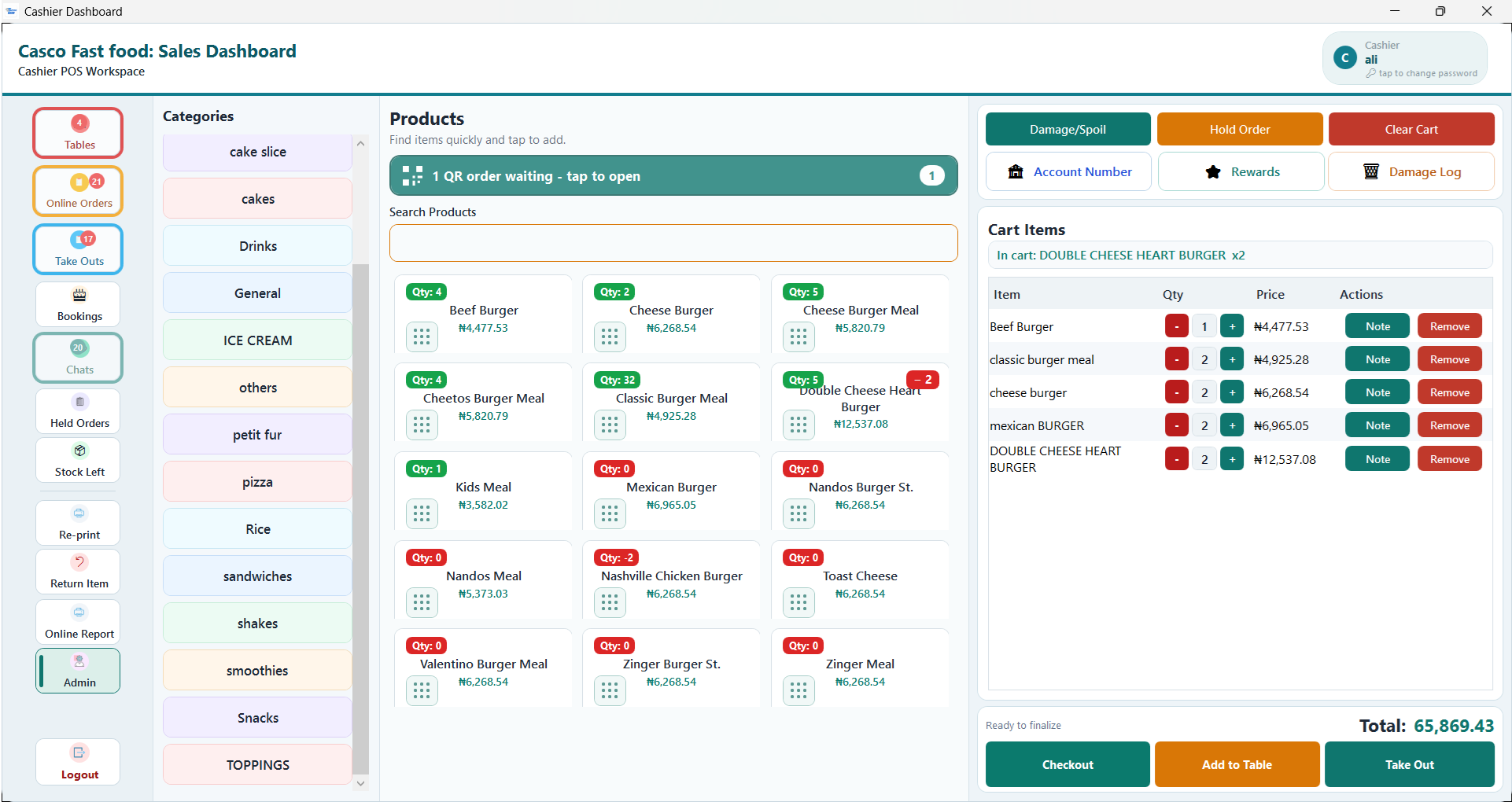
The cashier’s sales screen on the Windows desktop app.
What you get
Front of house, kitchen, stock and the money — with every order, wherever it came from, landing in the same app.
Ring up orders in seconds, split bills, park an order and take cash, card or bank transfer.
Sections and a floor plan you arrange yourself, bookings and advance orders.
Waiters take orders at the table on their phones, straight to the kitchen.
A kitchen screen, printed tickets, or both — with per-item notes like “no pepper”.
A second screen that shows the customer the bill as it builds.
Keeps selling when the internet drops and syncs safely once you are back.
Stock drops as you sell. Damage and spoilage are recorded, not just deleted.
The day’s takings, profit and each cashier’s sales, on the desktop and the phone.
An add-on assistant answers your customers on WhatsApp and Instagram and puts the order in your app.
A login for every cashier and waiter, and you decide what each one can see and do.
Each branch keeps its own stock and figures; report on one or all of them.
The day’s sales and the business at a glance, on the desktop and on your phone.
In detail
Each kind of order kept apart, all on one screen.
More ways in, and every order lands in the same app.
In Kano, a Tazroo rider is one tap away.
Know how the day is going without standing at the counter.
POS system or payment terminal?
A Moniepoint, OPay or bank terminal takes the payment. It does not know what was ordered, what the kitchen still has to cook, what is left in stock or which waiter served the table. Tazroo does: keep taking card payments on your terminal and record each sale on Tazroo as cash, card or transfer, so the day’s figures add up.
Pricing
One price for your whole business — not per cashier, not per device. Every plan includes every business type.
Desktop POS
or ₦6,000 / month
Desktop + Mobile
Both apps, one subscription
Mobile POS
or ₦6,000 / month
Complete
Everything we build
Questions
Yes. Tazroo keeps selling. Sales, stock and customer records save on the device, and everything syncs on its own when the connection comes back.
An ordinary Windows PC or laptop, or an Android phone or iPhone. It works with the usual receipt printers, kitchen printers and barcode scanners. A kitchen display screen and a customer display are optional.
The Desktop POS or the Mobile POS is ₦70,000 a year or ₦6,000 a month. Both together are ₦80,000 a year. Complete, with QR table ordering and a self-service screen, is ₦120,000 a year. The price is per business, not per cashier or per device.
Yes. The waiter app takes the order at the table and sends it to the kitchen display or the kitchen printer.
Yes. On the Complete plan each table gets a QR sticker and customers order from their own phone. The WhatsApp and Instagram assistant, priced on your order volume, answers customers and puts their order in your app.
Yes. We import from a spreadsheet, and there is a built-in importer for QuickBooks POS export files. We do the first load with you.
Tazroo is built and run by Algadong IT Solutions Ltd, Suite A13 Alhamsad Tower, opposite Ado Bayero Mall, Kano. Support answers 24 hours a day, every day, on 0913 000 0317 by phone or WhatsApp, and at [email protected].
Tell us what you sell and we will show you Tazroo running on your own products, then help you set up. Support answers 24 hours a day, every day.
Phone & WhatsApp
Office
Suite A13 Alhamsad Tower,
Opp. Ado Bayero Mall,
Kano, Nigeria
Tazroo Support
Online now · 24/7
Hi there 👋
How would you like to reach us? A real person answers, day or night.